
Dotcode for FMCG trade
Inventory and accounts software for FMCG wholesalers
FMCG distribution runs on volume and repetition: many product lines, frequent supplier receipts and retailers who expect accurate invoices. Dotcode keeps those records connected so stock, sales and account balances stay in step.
- Free product demo
- Unlimited users
- Setup and team training included
Keep a high-volume catalogue organized
A consumer goods catalogue changes constantly as new lines arrive and old ones are discontinued. Product records give every item a consistent code and supplier context, so counter staff, warehouse teams and accounts work from the same description.
- Product-level records instead of scattered SKU lists
- Supplier purchasing connected to the receiving location
- Sales invoices that update stock and the customer ledger together
Receive and replenish from clear purchase records
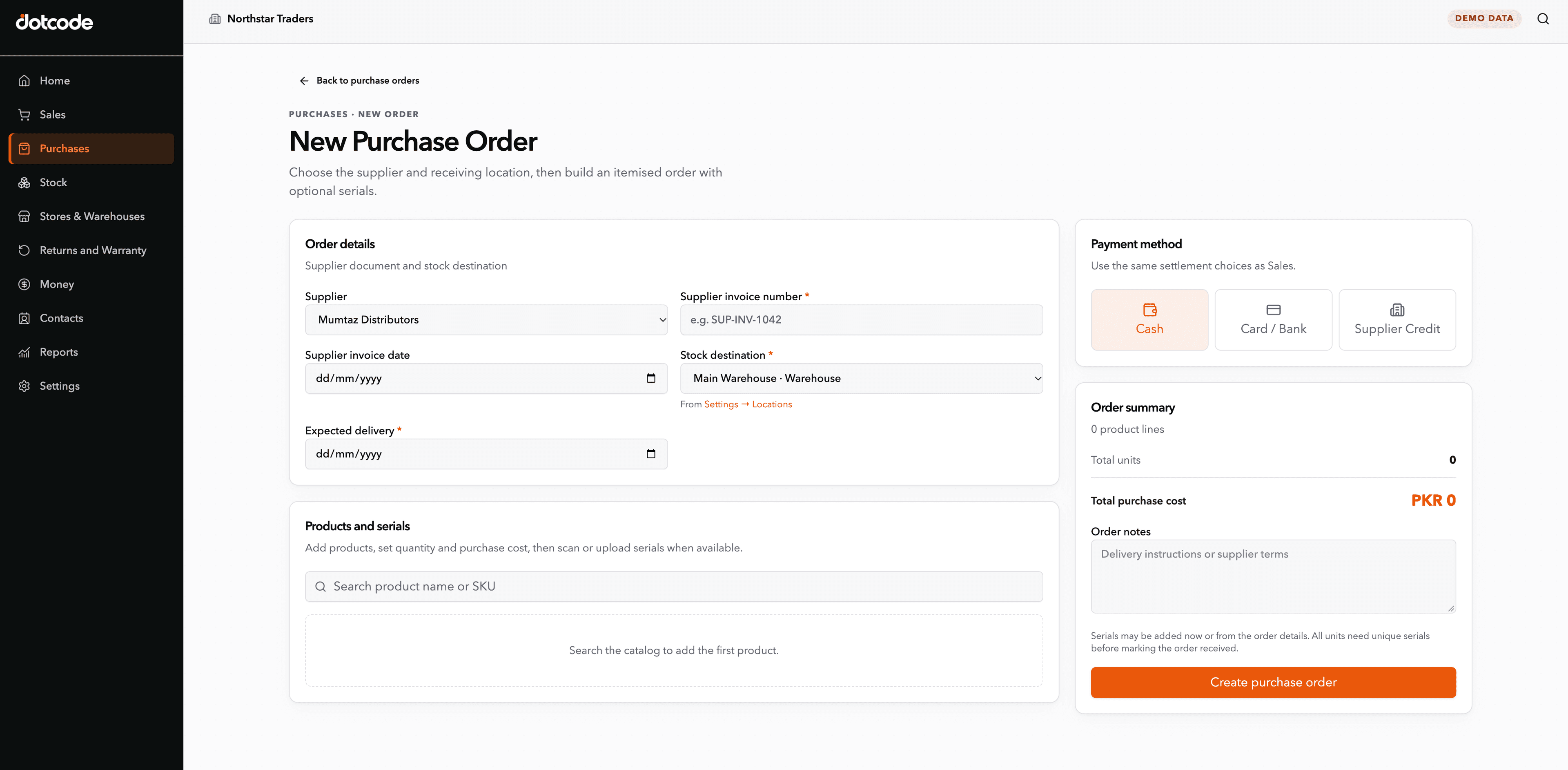
A purchase order identifies the supplier, the expected lines, costs and the warehouse that will receive the goods. When the delivery is confirmed, the stock increase stays linked to that commercial source rather than appearing as an unexplained adjustment.
Sell to retailers and watch the account, not just the invoice
FMCG wholesalers sell repeatedly to the same shops and resellers. Each invoice adds to the customer's running balance, and returns or adjustments post against the same account so the team can follow up on overdue amounts with the full history visible.
Run multiple warehouses from one system
Stock can be organized by warehouse, depot or outlet, with transfers recorded between locations. Teams see where quantities sit before promising a delivery, and accounts can review sales, purchases and cash alongside the stock records. Dotcode handles setup, supported data migration and team training.
Inside the workflow
High-volume receipts tied to the supplier and depot.
An FMCG purchase order names the supplier, the product lines, the costs and the destination warehouse. Receiving against that record creates the stock increase, so a fast-moving consignment can still be traced back to its source.
- Order: Select the supplier and receiving warehouse.
- Receive: Confirm the lines and quantities delivered.
- Update: Release the goods into sellable stock.
See whether QuickAccounts fits your workflow
Talk through your current records, team needs and setup before choosing a license.
Frequently asked questions
Can Dotcode handle a large FMCG product catalogue?
Records are organized at product level so staff can search and bill the right line. Share your SKU count and product structure during the demo so the team can confirm the setup.
Can we manage stock in more than one warehouse?
Yes. Warehouses and outlets are defined as separate locations, and transfers between them can be recorded so stock movement stays traceable.
How are returns from retailers handled?
Returns can be connected to the original invoice and customer account, with the stock and balance updated from the same transaction.
Does it track batch numbers or expiry dates?
Batch and expiry needs vary by product line and by how you report on them. Bring your requirements to the guided demo and the team will confirm what the setup covers before you commit.